Your Server Rack Looks Like a Snake Pit. Let's Fix It Before It Causes Issues.
I want to tell you about the longest 45 minutes of my life. It was 3 AM on a Tuesday morning in 2021. I was running a small hosting company as a side hustle, with a few racks of servers in a data center in San Jose, California. My phone goes off. It's our automated monitoring system, screaming at me. One of our main database servers is down. Not slow, not lagging. Down. Offline. A whole cluster of e-commerce sites we hosted, including one of my own, were completely dark. I jump in my car, chugging a lukewarm Red Bull, and race to the data center. I get to our rack, and my heart sinks. It was a complete and utter mess. A rat's nest of identical-looking black and blue Ethernet cables, a tangled mess of power cords. A spaghetti monster from heck. The blinking light on the monitoring panel told me which server was dead, but to figure out which cable went to which switch port? Which power cord was on which PDU? It was impossible. For 45 agonizing minutes, in the freezing cold of that data center, I played a game of 'Russian Roulette Unplugging'. I would trace a cable with my fingers, say a prayer, and pull it. One time, I unplugged the wrong server, taking another client offline momentarily. It was a complete, humiliating, and terrifying disaster. When I finally found and replaced the bad network cable, the sites came back up. But the damage was done. My clients were furious. I had violated their trust. And the root cause? It wasn't a faulty server. It was my own lazy, arrogant refusal to do one simple, boring thing: label my damn cables.
Look, nobody gets excited about cable management. It’s the janitorial work of the tech world. It’s tedious. It's boring. But after 5 years of building everything from home theaters to small-business server closets to massive e-commerce fulfillment centers, I can tell you this with the certainty of a religious zealot: your unlabeled cables are a catastrophic failure waiting to happen. It's not a question of if it will impact you, but when. And it will always be at the worst possible moment. A 2023 report from the Uptime Institute on data center outages found that over 30% of downtime incidents attributed to 'human error' could be traced back to poor or non-existent labeling and cable management. This isn't just about being neat; it's about uptime, reliability, and saving your job (or your business).
This isn't going to be a guide for professional data center technicians. This is the real-world, no-BS guide for the rest of us: the small business owner setting up a new office network, the home theater enthusiast who wants to actually be able to troubleshoot their system, the startup CTO who's building their first server rack on a shoestring budget. We're going to cover why your current 'system' is a joke, the simple, free framework for creating a sane labeling system, and the tools you can use to do it without losing your mind.
The Cascade of Chaos: How One Unlabeled Cable Can Wreck Your Day
The problem with cable chaos is that it compounds. One messy cable turns into ten. Ten turns into a hundred. And suddenly, you have a physical system that is impossible to understand. This leads to a few predictable, and expensive, outcomes:
- Massive Downtime: Like my story, when something goes wrong, your troubleshooting time goes from minutes to hours. In a business context, every minute of downtime is lost money. A 2022 Gartner report estimated the average cost of IT downtime at over $5,600 per minute, or over $300,000 per hour. Even for a small business, the costs add up fast.
- Accidental Outages: This is the 'oops, I pulled the wrong plug' scenario. It’s incredibly common. A well-meaning employee tries to move a desk, unplugs what they think is a lamp, and accidentally takes the entire sales department's network switch offline.
- Wasted Technician Time: If you ever have to hire an IT contractor, electrician, or AV installer, what do you think the first thing they do is when they see a mess of unlabeled cables? They start toning and tracing every single one. You are paying them hundreds of dollars an hour to do a job that a $0.10 label could have done for them.
- Fire Hazard: This is not an exaggeration. A tangled mess of power cords behind a rack can restrict airflow, cause heat buildup, and create a genuine fire risk, a fact highlighted in the NFPA's (National Fire Protection Association) own guidelines for server room safety.
Personal Story #2: The 'Simple' Office Move (Mumbai, 2019). I was helping a friend's startup move to a new office in Mumbai. They had about 20 employees. Their existing server closet looked like a Jackson Pollock painting made of CAT5 cable. The IT guy they hired took one look at it and said, “Boss, I can't just move this. I have to unplug everything and start from scratch at the new place. It's going to take me a full day.” That was a full day of lost productivity for a 20-person company, plus the contractor's fee, all because nobody had spent the initial two hours to label the cables when they were first installed. It was a completely avoidable ₹50,000 mistake.
The 'Start-to-Finish' Labeling Philosophy: A System for Sanity
Okay, so you're convinced. You need to label your cables. But what do you put on the label? Just writing 'Network Cable' is useless. The secret is the 'Start-to-Finish' philosophy. Every label should tell you two things: where this cable is coming from and where it's going to. You need to create a unique identifier for every device and every port.
A Simple Naming Convention:
| Device Type | Naming Scheme | Example |
|---|---|---|
| Network Switch | SW-Rack-Unit-## | SW-R1-U15-01 (Switch 01 in Rack 1 at Rack Unit 15) |
| Server | SRV-Function-## | SRV-DB-02 (Database Server 02) |
| Patch Panel | P-Rack-Unit-## | P-R1-U14-01 (Patch Panel 01 in Rack 1, Unit 14) |
| Wall Outlet / Jack | Room#-Jack# | 105-A (Room 105, Jack A) |
Now, when you create a label for a cable, you combine these identifiers. The label on both ends of a cable should have the same information. For example, the cable connecting your database server to the switch would have a label that looks like this:
FROM: SRV-DB-02 | Port: 1
TO: SW-R1-U15-01 | Port: G24
Now, if that server goes down, you don't have to trace a single cable. You just walk up to the switch, find port G24, and you've found your cable. The 30-second fix instead of the 45-minute disaster. This is the exact principle used by data center professionals, but you can implement it for free.
How to Create and Print Professional Cable Labels for Free
You don't need a fancy, expensive handheld label maker from Brother or Dymo to do this. You have a printer, and you have the internet. That's all you need.
The Spreadsheet and Thermal Printer Workflow (The Pro Method):
This is, by far, the most efficient method. It’s perfect for a new office setup or a full server rack build-out.
- Create Your Cable Schedule: This is your master plan. Open Google Sheets or Excel. Create a spreadsheet with columns for 'Cable_ID', 'From_Device', 'From_Port', 'To_Device', 'To_Port', and 'Cable_Type' (e.g., CAT6, Power). Plan out every single connection in your system. This seems tedious, but it forces you to think through your entire network logically.
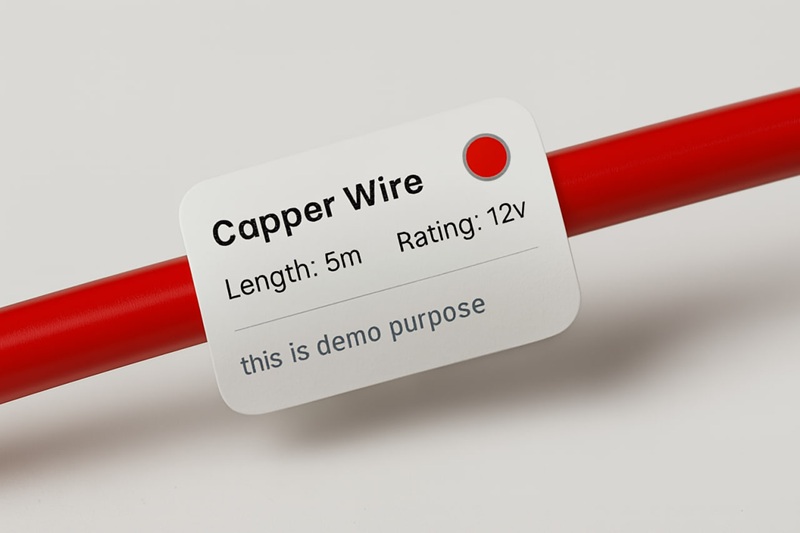
- Use a Bulk Label Generator: Find a free online tool designed for this. The cable and wire label maker I built on this site is perfect for this workflow. Download the sample CSV.
- Map Your Data: Copy the data from your Cable Schedule spreadsheet into the template provided by the tool. You'll map your 'From' and 'To' columns to the tool's fields.
- Generate and Print: Upload the CSV. The tool will generate a PDF with hundreds of your unique labels, perfectly formatted for a small thermal label size (like 60x20mm). Send this to your thermal printer. A thermal printer is ideal because the labels are durable, smudge-proof, and incredibly cheap to print. My guide to the best budget thermal printers can help you choose one without breaking the bank.
The 'I Just Need a Few Labels' Method (A4/Letter Sheet):
- Use the 'Single Item' Mode: Go to an online label generator. Use the 'Single Item' mode.
- Enter Your Data: Type in the 'From' and 'To' information for the one cable you need to label.
- Print on Sticker Paper: Print the label onto a full sheet of A4/Letter sticker paper.
- Cut and Wrap: Cut out the label. The key here is to use the 'flag' method. Wrap the label around the cable so that it sticks to itself, creating a small flag. This is much more durable and easier to read than trying to wrap the sticker flush against the cable. For extra durability, you can put a piece of clear packing tape over the paper label before you wrap it.
Real-World Use Cases: It's Not Just for Server Rooms
Personal Story #3: The Home Theater Hero (USA, 2023). My father-in-law in Florida is a classic 'tinkerer'. He bought a fancy new AV receiver, a 4K Blu-ray player, a new Apple TV, a turntable... and his entertainment center looked like a problem had occurred. Nothing worked right. He called me in a panic. I spent an entire afternoon unplugging everything and starting from scratch. But this time, I came prepared. I used my laptop and a portable thermal printer. Every single HDMI and speaker cable got a label. 'TV (HDMI 1/ARC)' -> 'Receiver (HDMI Out)'. 'Turntable (Phono)' -> 'Receiver (Phono In)'. Now, when something doesn't work, he can actually troubleshoot it himself. He feels empowered. He thinks I'm a genius. All I did was print some stickers.
Personal Story #4: The Manufacturing Line Fix (India, 2022). I was consulting for a small manufacturing plant in Pune, India. Their production line kept having intermittent electrical faults. The maintenance team would spend hours trying to figure out which circuit breaker in the massive, unlabeled electrical panel corresponded to which machine on the factory floor. We spent one weekend with a label maker and a circuit tracer. We created a clear, color-coded labeling system for every single breaker. The next time a machine faulted, the maintenance team was able to identify and reset the correct breaker in under 60 seconds. A study by the Eaton Corporation on electrical safety found that proper labeling can reduce troubleshooting time for electrical faults by up to 75%.
Personal Story #5: The Small Office Network (USA, 2024). A friend started a small law firm with 10 employees in Austin, Texas. They had an ISP modem, a router, a network switch, and a small NAS for file storage, all shoved into a dusty closet. I refused to let them make the same mistakes I did. We used a simple color-coding system. All cables coming from the modem were red. All cables going to the router were blue. All cables going from the switch to the wall ports were green. And every single cable was flagged with a 'From/To' label. Six months later, their internet went down. I was able to walk my non-technical friend through troubleshooting over the phone in five minutes. 'Okay, find the red cable from the modem. Unplug it for 30 seconds.' Problem solved. No expensive IT call-out needed.
The 'Do It Right the First Time' Cable Labeling Checklist
- Plan Ahead: Before you plug in a single cable, make a plan. Use a spreadsheet. It will save you from yourself.
- Standardize Your Naming: Create a simple, logical naming convention for your devices and ports. Stick to it religiously.
- Label Both Ends: A label on only one end of a cable is only half as useful. Both ends must have the same 'From/To' information.
- Use a Durable Label: Paper and a Sharpie won't cut it. Use a thermal printer for maximum durability, or at least cover your paper labels with clear tape.
- Color Code for a Quick Visual: Use different colored cables or small colored zip ties for different functions (e.g., red for power, blue for network, yellow for audio/video). This, combined with labels, makes identification instant. This approach is recommended by data center design standards like those from BICSI.
- Don't Be Lazy: Yes, it takes an extra 30 seconds to create and apply a label to that one 'temporary' cable you're plugging in. Do it. There is no such thing as a 'temporary' cable. That cable will be there five years from now, and you'll have no idea what it does.
Look, dude, I get it. This is the boring stuff. It’s the behind-the-scenes grunt work that no one sees. But your ability to master this boring stuff is what will allow you to scale. It’s the invisible engine that drives a profitable e-commerce machine. My $400 mistake with Mark’s order wasn't a shipping problem; it was an inventory problem. The chaos in your warehouse isn't just messy; it's a gaping hole in your bank account. Plug the hole. Label your stuff. It's the most profitable 'boring' task you'll ever do.